Flying Manually
At a glance
How to fly a Homebrew manually: pre-flight, the transmitter's switches, takeoff, in-flight conduct, and landing. Read the warnings first.
This Guide Is for Max Gardenswartz's Personal Radio
This guide is for Max Gardenswartz's personal radio (a Taranis QX7). It is not a long-term solution for the lab. After Max graduates, flying manually will need to be set up again from scratch.
New to flying? Practice in a simulator first.
Set Up the RTK Ground Station First
This robot uses RTK corrections from the ground station. Before you do anything else, set up the RTK ground station.
What a Good Fix Is for a Quadcopter
A good fix is fix_type 6, always. Read the fix_type entry of <namespace>/mavros/gpsstatus/gps1/raw. When everything works, every single message coming out of MAVROS shows 6 (RTK fixed) while flying around, never less.
This reliability is only tested up to three quadcopters under the current setup: RTKLib on the discovery server computer. Three agents have also been tested with the Emlid RS3's embedded caster, which sends corrections over an individual link to every quadcopter (every local NTRIP client). That is not reliable at all: the fix drops out randomly and intermittently. Even with one agent, flying can reduce the fix to 5 from what it was on the ground, with no recovery and no explanation. Use the RTKLib caster, never the embedded caster.
Wait for the Fix to Reach 6
Getting a fix takes 5 to 15 minutes. Until fix_type reaches 6, expect lots of "Global position estimate invalid" errors. A fix of 5 (RTK float) can make flights unstable, so it is very important to wait for 6 (fixed) before you fly.
The fix should drop to 5 or lower, even for a single frame, only if you hit the ground hard, crash, or the satellites cut out. (The satellites cut out once in 100 flight hours.) Moving fast or changing altitude should never demote the fix.
Multi-agent testing has not been done, so it is unknown whether network traffic, or changing access points, affects the fix.
An Easier Way to Check the Fix
Click the GPS icon in the Fly tab of AMC (Astros) or QGC (Homebrews) to check the RTK fix.
Never Fly in Acro Mode
Acro Mode must never be attempted, under any circumstances.
Flying in Stabilized Mode requires expertise. Novice pilots must not attempt it.
Position Mode is already quite fast. Be very careful and move the sticks very slowly.
Keep the Optical Flow and Lidar Clear
Make sure no cables are in the way of the optical flow sensor or the lidar. Make sure the lidar's position does not obscure the optical flow sensor: they are close to each other.
Always Watch the Battery
The pilot must always watch the battery while flying. Conservative failsafes stop you from flying on a low battery, but they do not replace watching it.
Leaving a drone plugged in for a long time (for example 3 hours) does not prevent the battery from draining slowly. You can easily draw a LiPo below its safe limit of 3.0 V per cell. This permanently damages the battery, and PX4 gives no warning at all.
The Taranis QX7 Is Max Gardenswartz's Personal Radio
The Taranis QX7 belongs to Max Gardenswartz personally, not to the lab, and he will not leave it with the lab when he graduates in 2028. He set it up for test flights because it was familiar and convenient. Research funds can only buy equipment that is on the Blue list, so the lab needs a better long-term plan: see Radio and RC Setup.
Transmitter Configuration (Taranis QX7)
The following mapping is standard for the Homebrew fleet. Refer to the diagram below for switch locations.
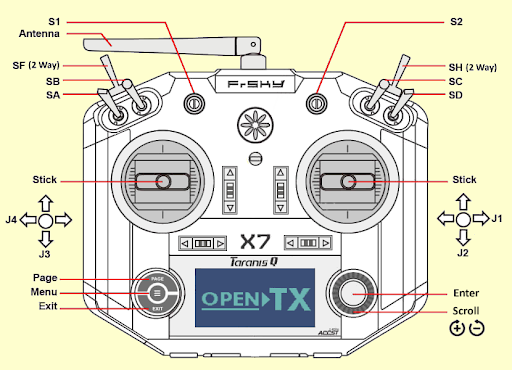
The Taranis QX7 switch locations.
Control Mapping
| Channel | Input | Function |
|---|---|---|
| 1 | Right Stick (X) | Roll |
| 2 | Right Stick (Y) | Pitch |
| 3 | Left Stick (Y) | Throttle |
| 4 | Left Stick (X) | Yaw |
| 5 | Switch A (SA) | Mode Logic (Primary) |
| 6 | Switch B (SB) | Mode Logic (Secondary) |
| 9 | Switch F (SF) | Arm / Disarm (2-Position) |
| 10 | Switch H (SH) | Return to Launch (RTL) |
PX4 Flight Mode Logic
| SA Position | SB Position | Resulting Flight Mode |
|---|---|---|
| Up / Middle | Up | Position (GPS Horizontal Hold) |
| Up / Middle | Middle | Hold (GPS Loiter) |
| Up / Middle | Down | Land (Automatic Descent) |
| Down | Up | Altitude (Baro/Z-axis Hold only) |
| Down | Middle | Altitude (Baro/Z-axis Hold only) |
| Down | Down | Stabilized (Full Manual / Self-Level) |
Flight Operations
Takeoff Loop (The "30-50-70" Rule)
- Mode Select: Before arming, put the remote in Position Mode (SA Up, SB Up), or whichever mode you intend to fly in. Do not arm in Stabilized Mode.
- Arm: Flick Switch F up. (It should start down.)
- Launch: Within 5 seconds, bring the throttle to 30-50%.
- Hover: Increase throttle to ~70% (Hover).
- Note: Position Mode holds both position and altitude when the sticks are centered. See the PX4 v1.16 multicopter flight modes.
In-Flight Conduct
- No Acrobatics: These are research platforms, not racing drones. No flips, rolls, or high-speed maneuvers.
- Stay in Mode: Once armed, it is very dangerous to switch flight modes. The only exceptions are Land and Hold. The sudden change in GPS dependency can cause instability that is difficult to recover from.
- Remote Safety: Never set the remote on the ground or a chair while the drone is live. The Arm switch (SF) is easily bumped by clothing.
Landing Procedure
- Maintain Mode: Stay in your current flight mode (Position mode is acceptable for landing).
- Slow Descent: Ease the throttle down as slowly as possible.
- The Ground Effect: As you approach the floor, an air cushion (Ground Effect) will make the drone "float." You will need to slowly decrease throttle further to punch through this cushion for touchdown.
- Disarm: Once the landing gear makes contact, flick Switch F (SF) to the Down position.
- Safety Buffer: Wait for the motors to come to a complete stop before entering the net.
Warning: In the current PX4 configuration, the disarm switch is not a "Kill Switch." If flipped in the air, the drone will attempt to land rather than cutting power immediately.
Position Mode Should Hold Position
With the sticks centered, a Homebrew in Position Mode holds its position and altitude indefinitely without drifting. The PX4 v1.16 documentation describes all the multicopter flight modes: Flight Modes (Multicopter).
- With RTK: unbounded drift, or drift of more than 0.5 to 1 m vertically or horizontally, is not normal.
- Without RTK: expect to hold within about 1.5 m vertically and 1 m horizontally, and no worse.
If the quadcopter drifts more than this, land and check the fix: see RTK Setup.